
On 1 March 2027, Shopify stops loading an older kind of app code on store pages, called script tags. Any app feature that still depends on one, like a sign-up pop-up or a chat bubble, stops working that day. Each app's developer can patch it, and on a vintage theme such as Debut or Supply, the patch keeps the feature running and does nothing more.
This article is for store owners, not developers: what changes, how to check your apps in about an hour, and why 1 March is the date to move off a vintage theme.
In short
- From 1 March 2027, Shopify stops adding script tags to storefront pages. Since 1 October 2026, apps can't create new ones.
- What can stop: app features on your store whose developer hasn't moved them yet. Pop-ups, chat, review widgets, loyalty panels and tracking are the usual candidates.
- On a vintage theme, the patch keeps an app running and stops there. Shopify marks "enhanced app support" as unavailable on vintage themes, which get security fixes only.
- Your part: list your apps, ask each developer one question, switch on what they release, test on your phone. On a vintage theme, change theme first and set your apps up once.
How to use this article
Set aside about an hour. You need your Shopify admin, a computer with a browser, and your phone.
Open your app list next to this page. The six sections below describe the kinds of app that put something on your store. For each app you have, find its kind, run the check, and write down one of three words: moved, moving or no answer.
Then use the rule further down. It turns those three words into what to do next, and when.
None of this needs code. One step asks you to look at your store's page source; it's optional, and the developer's answer still decides.
What's changing, in plain words
An app that shows something on your store has to get its code onto your pages. For years, one common way was a script tag: the app asked Shopify to add a line of code to every page, and Shopify did it, on any theme. It never appeared in your theme editor. It just ran.
Shopify has deprecated script tags, and two dates matter:
- 1 October 2026. Apps can no longer create or update script tags. The ones already on your store keep running.
- 1 March 2027. Shopify stops adding script tags to storefront pages, and any feature that depends on one stops working on that store.
The first date has passed without anything changing on your store. The second is the one your customers will notice.
It has already happened in one place. On the Order status page, the one customers see after they buy, Shopify's guide says script tags stopped running on 26 August 2026 for most stores, and on 28 August 2025 for Shopify Plus stores. If an app used to show something or count sales on that page, that part has already moved or already stopped.
What replaces them. Developers move their code to one of two places:
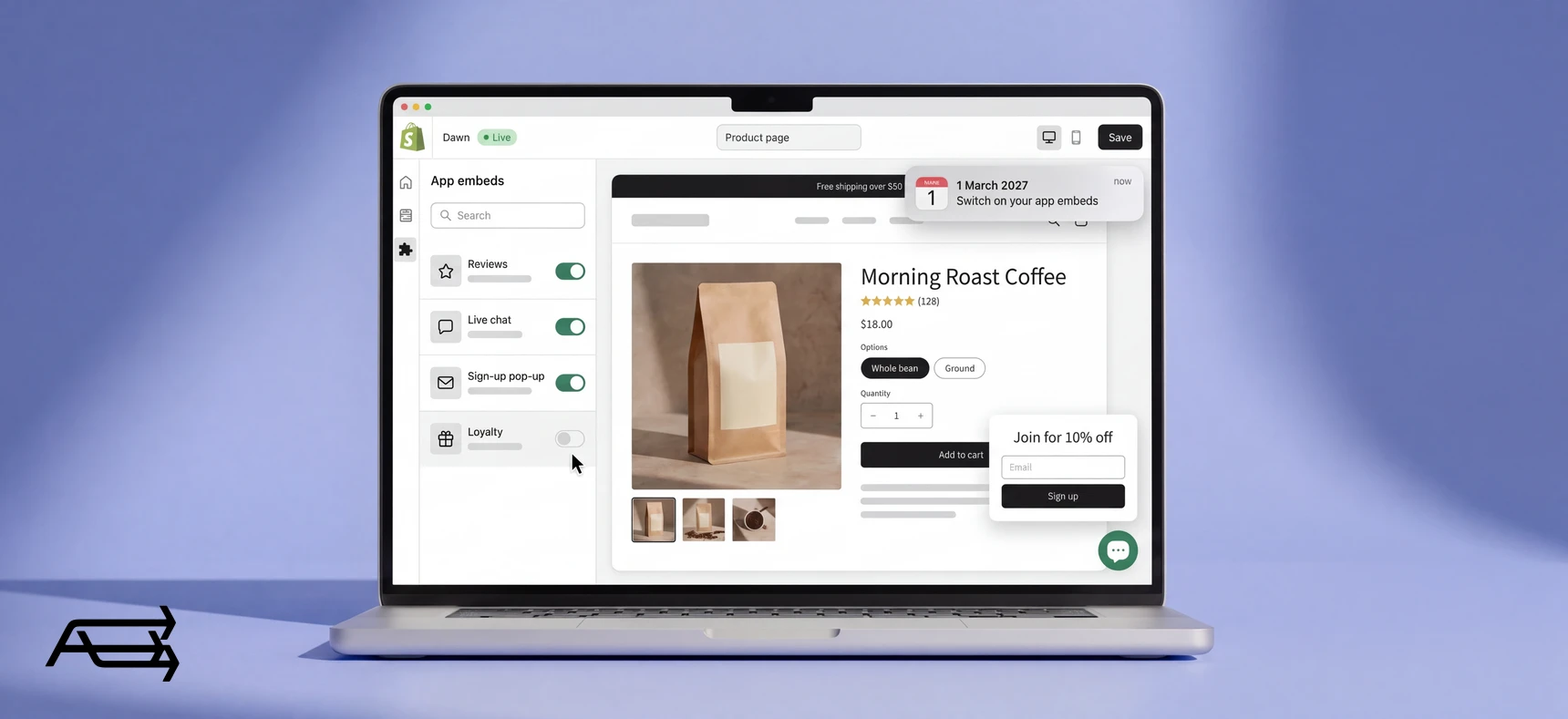
- An app embed, for anything that runs on your pages: a pop-up, a chat bubble, a widget, or code that works in the background. It shows up in your theme editor as a switch under App embeds, and Shopify's developer guide says app embeds "are inactive until an app user turns them on". That's you.
- A web pixel, for tracking only, such as analytics and ad conversions. Shopify says a web pixel needs no action from you. There's no switch.
An app that has moved to one of these is finished with this change. An app that hasn't is the one to ask about.
What it doesn't touch. Your products, orders, customers and pages, which don't load through script tags. Apps that only work in your admin, such as accounting or inventory tools. And code written straight into your theme files, which isn't a script tag and keeps running.
What it means on a vintage theme
If your store runs Debut, Supply, Minimal, Brooklyn or another vintage theme, the app updates still reach you: Shopify's guide says an app embed "works on vintage themes as well as Online Store 2.0 themes". That's the patch. It leaves four things as they were.
Apps can't sit inside your pages the newer way. On an Online Store 2.0 theme, an app can also come as an app block, which you add in the theme editor where you want it, without editing theme code. Shopify says app blocks only work with compatible themes, and its comparison of theme versions marks "Enhanced app support", described as "Install or change apps without touching any code", as unavailable on vintage themes.
The theme stands still. The same page says Shopify's free vintage themes "don't receive updates beyond security fixes". Sections on every page, collection filters and predictive search are all marked unavailable for them.
Old code stays. Shopify notes that some app code "isn't automatically removed when you uninstall the app". The script tag change doesn't touch it. A current theme starts without it, because that code lives in the old theme's files.
The switches are per theme. Shopify's guide says an app embed "is only active on the theme it was enabled on", so after a theme change you turn your apps on again. Patch your apps on a vintage theme in February, change theme in the summer, and you do the list twice. Change theme first and you do it once.
Together, these make 1 March the date to move to a current theme. Our articles on being stuck on an old theme and what happens when you change theme cover how the move goes.
Six kinds of app to check
Apps that put something on your store fall into six kinds. Each section below has the same four parts: what the app does on your store, what happens if it hasn't moved by 1 March, a check you can run today, and your part.
1. Pop-ups, sign-up forms and SMS opt-ins
What it does on your store. Collects email addresses and phone numbers, usually in exchange for a discount, and shows offers at set moments.
If it hasn't moved by 1 March. The form doesn't appear. Orders carry on, so nothing looks broken, but your list stops growing. The first sign may be a campaign that goes out to fewer new people than usual.
The check. Open your store on your phone in a private window and wait for the form. Then open your email or SMS tool and write down how many people signed up last week. That number is what you'll compare against in March.
Your part. Ask the developer, and switch on the app embed when it arrives.
2. Chat and help widgets
What it does on your store. The bubble in the corner that lets a shopper ask a question before buying.
If it hasn't moved by 1 March. The bubble disappears. A shopper with a question about sizing or delivery has nowhere to ask it, unless they go looking for your email address.
The check. Look for the bubble on a product page and in the cart, on your phone and on a computer. Note how many conversations came in last week.
Your part. Ask the developer, and switch on the app embed when it arrives.
3. Reviews, loyalty and other widgets on the page
What it does on your store. Star ratings under the price, review lists, a rewards tab, a wishlist button, an upsell box in the cart. Anything an app draws inside your pages.
If it hasn't moved by 1 March. The page still loads, with a gap where the widget was. Stars that vanish from product pages take a trust signal with them, and a missing rewards tab means returning customers can't see their points.
The check. Walk through a product page, the cart and the customer account page, and list every element that comes from an app rather than from your theme.
Your part. Ask the developer, and switch on what they release. On a vintage theme, expect an app embed even for a widget that sits inside the page, with the app's code deciding where it goes. On a newer theme you'd add an app block and put it where you want it. This is where a vintage theme shows its age.
4. Tracking and ad pixels
What it does on your store. Tells Google, Meta, TikTok or your analytics tool which visits ended in a sale.
If it hasn't moved by 1 March. Customers notice nothing. You stop seeing conversions from that tool, and an ad platform that stops hearing about sales can't tell which ads are working. Of the six, this is the one most likely to fail without anyone noticing for weeks.
The check. In each ad platform and in your analytics, write down the conversions for a normal week now.
Your part. Usually nothing. The replacement, a web pixel, runs without a switch. But ask the developer, and watch the numbers either side of the change for a second reason: Shopify warns that if the old script and its replacement run at the same time, the script "loads twice", which can count the same sale twice.
5. Helpers you never see
What it does on your store. Code that runs in the background and shows nothing: fraud screening, discount or ID verification, consent tools, testing tools. Shopify's own description of app embeds includes apps that "add code to the store without being visible to customers".
If it hasn't moved by 1 March. Nothing visible changes. The job just stops being done, and you find out when something it used to catch gets through.
The check. Go through your app list for anything you pay for but can't point to on your store. Those are the ones to ask about first, because there's nothing to look at.
Your part. Ask the developer, and switch on the app embed if there is one.
6. A custom app someone built for you
What it does on your store. Whatever it was built to do. If a developer or agency once made an app just for your store, it may have been created directly in your Shopify admin rather than published on the App Store.
If it hasn't moved by 1 March. That feature stops like any other. The difference is that this kind of app has nowhere simple to move to. Shopify says apps created in the admin "have no extension-based replacement for script tags".
The check. Ask the person who built it how it was made and whether it uses script tags. If you don't know who built it, that's your answer to who will fix it: someone new.
Your part. This is the one that needs a developer. Shopify's guide gives two routes: build a proper app to replace it, or move the code into your theme. The second is quicker, and Shopify calls it a last resort, because "editing theme code takes the theme off its automatic upgrade path". On a vintage theme, that's paid work in a theme Shopify only patches for security, and the code stays behind when you change theme. If a change is coming, have the code built into the new one.
The six at a glance
| # | Kind of app | If it hasn't moved by 1 March | Your part |
|---|---|---|---|
| 1 | Pop-ups, sign-up forms, SMS opt-ins | The form doesn't appear; the list stops growing | Ask, then switch on the embed |
| 2 | Chat and help widgets | The bubble disappears | Ask, then switch on the embed |
| 3 | Reviews, loyalty, page widgets | A gap where the widget was | Ask, then switch on what they release |
| 4 | Tracking and ad pixels | Conversions stop showing, or show twice | Usually nothing; watch the numbers |
| 5 | Helpers you never see | Nothing visible; the job stops | Ask first, then switch on the embed |
| 6 | A custom app built for you | The feature stops; no simple replacement | Needs a developer, ideally in the new theme |
Moved, moving or no answer: what to do with each
By now every app on your list has one of three words next to it.
- Moved. The developer says it already uses an app embed or a web pixel. Check that its embed is switched on in your published theme, and you're done with it.
- Moving, with a date before 1 March. Put the date in your calendar. Switch the embed on when it arrives, and test the feature on your phone that same day.
- No answer, no date, or "we're looking into it". Plan as if that feature stops on 1 March. Start looking at replacement apps now, while there's time to set one up and test it properly.
Our rule for the third group: if there's no firm answer by the end of January, replace the app. February leaves enough time to switch calmly, and not much more. A custom app built in your admin goes in this group unless its builder tells you otherwise in writing.
On a vintage theme, one more rule. If two or more apps land in the third group, or you have a custom app, there's setup work either way. Doing it once, in a new theme, is less work than doing it twice.
What this change won't fix
Code old apps left in your theme. It stays where it is. Clearing it by hand means going through theme files one by one; a fresh theme leaves it behind.
A vintage theme's limits. If your product pages can't take new sections, or app blocks don't appear in your editor, that comes from your theme. App embeds keep your apps running on it. They don't give it what newer themes have.
An app nobody maintains. If an app hasn't been updated in years and its developer doesn't answer, this date only brings a decision forward. That app was a risk before October, and it's a bigger one now.
All three end in the same place: a current theme, set up with your apps and without the old code. That's our Store Design & Theme Development work, and your store keeps selling while we build it.
Eight steps before 1 March
Do this in the next few weeks rather than at the end of February. If an app needs replacing, you want time to pick one and test it, and not during your busiest sales weeks.
- Decide on the theme first. If you're on a vintage theme, change it before you switch any embeds on. Embeds are per theme, and changing first means you go through your apps once.
- List your apps. In your Shopify admin, go to Settings > Apps and open the Installed tab. Write down every app.
- Cross out the admin-only ones. Keep every app that shows something to customers or tracks visits, and anything you're unsure about.
- Optional: look for a clue in your page source. On a computer, open your store's homepage in Chrome, right-click and choose View page source, then search the page for
asyncLoad. On the stores we checked, this is followed by a list of web addresses that Shopify adds for apps through script tags, and the addresses usually contain the app's name. Treat what you find as a clue for your questions. The developer's answer is what counts. - Ask each developer one question, in writing. Through the app's support page or email: "Does your app still use script tags on my storefront? If it does, when will it move to an app embed or a web pixel, and will I need to switch anything on?" A date is an answer. "We're looking into it" isn't.
- Switch on the embeds when they arrive. In your admin, go to Online Store, click Edit theme on your published theme, and open the App embeds icon in the sidebar. Turn the app on and click Save. Some apps send a link that opens this screen for you; check the switch is on and save anyway.
- Test on your phone. Homepage, a product page, the cart. Look for each feature on your list. Then do the same on a computer.
- Check your numbers in March. Compare sign-ups, chat conversations and ad conversions for the first two weeks of March with the numbers you wrote down. A drop points to an app that didn't move. A sudden jump points to one running twice.
Do it yourself, or hand it to us?
The app check on your own. An hour for the list. Then an email to each developer, and follow-ups until each one gives you a date. Then a switch per app, a test on your phone, and your numbers in March. Expect a few weeks of chasing. A custom app, or code written into your theme, needs a developer either way.
A theme change on your own. You learn a new theme editor, rebuild your homepage and product pages, set every app up again and test on every device before you publish. All of it can be learned. It's also hours each week taken from your products and your customers, in the weeks before a deadline.
What we do. We check every app that loads on your pages and tell you which ones stop on 1 March. On a vintage theme, we move you to a current one, built away from your live store, with your apps set up as blocks and embeds and none of the old code. You keep selling while we build, and the work takes us days. That's our Store Design & Theme Development work; the app review is part of Custom Development & Apps.
Questions store owners ask
Should I change my vintage theme before 1 March 2027?
Yes, it's the date we'd use. Your apps can be patched to keep running on a vintage theme, and that's all the patch does: no app blocks, and a theme Shopify updates for security fixes only. App embeds are switched on per theme, so changing first means you set your apps up once.
Will my store stop working on 1 March 2027?
No. Your store stays online, and your products, orders and pages aren't touched. Only app features that still load through script tags stop, and only on stores where the developer hasn't moved them.
How do I know which of my apps use script tags?
Ask each developer; that's the reliable way. Shopify's guidance on this change is written for developers and doesn't describe a check for store owners. The page-source search in step 4 above gives you a clue to start with, and our free Store Audit lists the app scripts loading on your pages.
What if an app's developer doesn't answer?
Plan as if the feature stops on 1 March, and choose a replacement while there's time to test it. If there's no firm answer by the end of January, we'd replace the app.
Has anything already stopped?
On the Order status page, yes. Script tags stopped running there on 26 August 2026 for most stores, and on 28 August 2025 for Shopify Plus. Everywhere else on your store, they run until 1 March 2027.
Get a free Store Audit before 1 March
Send us your store URL and we'll send your Store Audit the same day: your theme and its version, what it can't do, the app scripts that stop on 1 March, and the old code still in your theme. It's free.