
People arrive, look around, and leave. That isn't one problem, it's four, and they happen in order: the first few seconds, the product page, the cart, the checkout. Fix them in the wrong order and the numbers don't move, because the leak you closed was never the one losing the money.
In short
- The job is to find the stage where people drop, not to work through somebody's list of fixes.
- Four stages, in order: the first five seconds, the product page, the cart, the checkout.
- Before any of that, two questions: where did the sessions come from, and did those people ever intend to buy? A store selling nothing from cold social has a traffic problem, not a store problem.
- Under a few hundred sessions a month, your conversion rate is noise. Two extra orders move it more than any redesign would.
How to run this check
Twenty minutes, your Shopify admin and your phone.
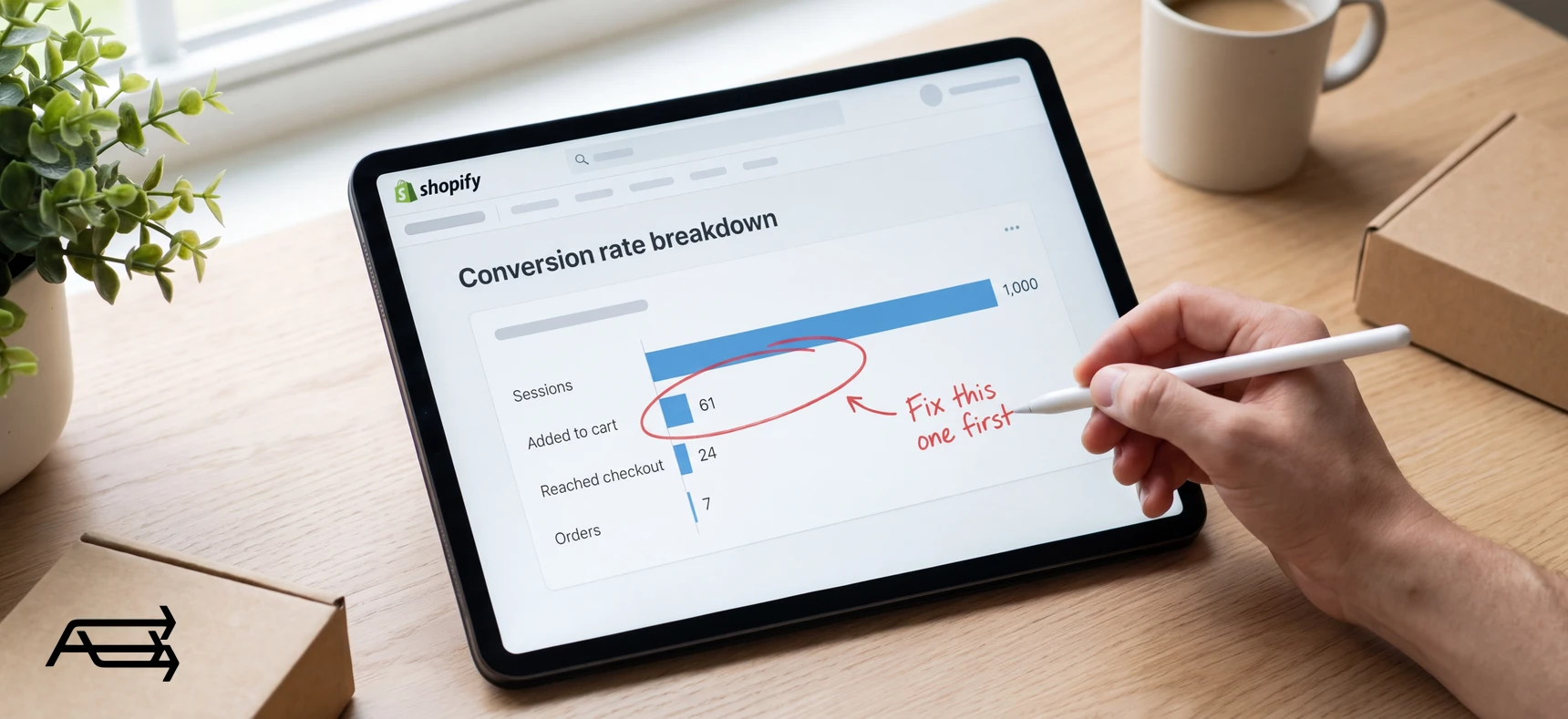
What you need. The Conversion rate breakdown report, which shows your visitors as four steps: All sessions, Sessions with cart additions, Sessions that reached checkout and Sessions that completed checkout. Each step's rate is its sessions divided by total sessions (Shopify Help). Then Sessions by referrer, which shows whether people came directly, from search or from a referral (Shopify Help), and Sessions by device.
Write down four numbers: sessions, cart additions, checkouts reached, orders. Then the drop between each pair. The earliest big drop is your leak.
One warning about the numbers. Shopify changed how it counts sessions, rolling out 21 to 23 September 2026: sessions now run on continued activity instead of ending at midnight, some sessions without a pageview are counted, and bots are filtered out. In Shopify's words, "When your session count changes, your conversion rate can also change, even when your orders or sales haven't changed" (Shopify Help). Don't compare October against August. Treat the data after the update as your new baseline.
A worked example, and only an example. The numbers below are invented to show the method.
| Step | Sessions | Drop from the step before |
|---|---|---|
| Sessions | 1,000 | |
| Viewed a product | 380 | −62% |
| Added to cart | 61 | −84% |
| Orders | 7 | −89% |
Six visitors in ten never reach a product at all. That is the earliest big drop, so that is where the work goes, not the checkout, even though the checkout looks worse on paper.
First: is it the store, or the traffic?
Where did the sessions come from? Open Sessions by referrer. Search and direct traffic are people who went looking; cold social feeds and bought clicks are people who were interrupted. The same store can convert well from one and near zero from the other.
Did those people ever intend to buy? In Baymard Institute's cart-abandonment research, 42% of US shoppers said they abandoned because they were just browsing or not ready to buy, which is why Baymard separates that group out before listing the fixable reasons (Baymard, list updated September 2025). Browsing is normal; it's a problem only when nearly all your traffic is that group.
If most sessions are cold social or paid clicks and they convert near zero, you have a traffic problem: fix the targeting, or move the budget to a channel where people are already looking for what you sell. That's work we do too, in our paid media work. If your search and direct traffic doesn't buy either, carry on.
Stage 1 · The first five seconds
Everyone who lands and never reaches a product: the gap between All sessions and the sessions that add anything to a cart.
A visitor can't tell what you sell
What it looks like. A rotating banner with a slogan on it, a menu of fifteen items, and a pop-up asking for an email before a single product appears.
What it costs. People who can't place your store in a second have no reason to spend one more. Pop-ups make it worse, and Google is direct: intrusive dialogs and interstitials "make it hard for Google and other search engines to understand your content, which may lead to poor search performance" (Google Search Central, updated 10 December 2025).
How to see it in your own numbers. Sessions by landing page. If the homepage takes most of your traffic and almost none of it adds to a cart, the first screen is doing nothing.
The fix. One still image, one sentence naming what you sell and who it's for, one button, real products above the fold. Delay the pop-up, or show it on exit.
The store is slow on a phone
What it looks like. A white screen, then a logo, then the images one by one.
What it costs. Shopify puts it plainly: "If a site is slow or difficult to navigate, then visitors are more likely to leave before they buy something," and adds that search engines use page speed as a ranking factor (Shopify Help).
How to see it in your own numbers. The Largest Contentful Paint reports in your admin, built from real visitors. Shopify rates LCP good at 2,500 ms or less, poor above 4,000 (Shopify Help); Google's guidance matches, at 2.5 seconds measured across the 75th percentile of page loads (web.dev).
The fix. Compress the hero image, remove apps you no longer use, and read the mobile numbers on their own. Desktop scores hide a slow phone.
Nothing says a person is behind the store
What it looks like. No address, no photographs of the actual products, no policy pages, a contact page with a form and nothing else.
What it costs. In Baymard's list, 19% of shoppers who abandoned said they didn't trust the site with their credit card information (Baymard).
How to see it in your own numbers. You can't, directly, which is what makes it easy to ignore.
The fix. A real About page with a photograph, a visible contact method, shipping and returns in plain words, and your own product photographs instead of the supplier's.
Stage 2 · The product page
Everyone who saw a product and didn't add it: the drop into Sessions with cart additions.
The photos don't answer the question
What it looks like. Two images, both the supplier's, both on white, no scale, no detail, no back view.
What it costs. Online, the photographs are the product.
How to see it in your own numbers. Compare cart-addition rates across your top products. If one converts and a similar one doesn't, look at the photographs first.
The fix. Six to eight images per product: in use, something for scale, a close-up of the material, and the back. Shoot them yourself if the supplier's images are all you have.
No reviews near the price
What it looks like. Title, price, button. Reviews at the bottom of the page, or nowhere.
What it costs. The question "is this any good?" is asked at the price, so it has to be answered at the price.
How to see it in your own numbers. Products with reviews against products without.
The fix. A reviews app, stars under the title, review requests after delivery. Show the three-star ones too. A wall of five stars reads as fake.
Delivery cost and date aren't on the page
What it looks like. The price is there. What shipping costs, and when it arrives, stays a mystery until checkout.
What it costs. The biggest single reason in Baymard's list: 40% of abandoning shoppers said extra costs (shipping, tax, fees) were too high. Another 20% said delivery was too slow, and 12% couldn't see or calculate the total cost up front (Baymard).
How to see it in your own numbers. A heavy drop from cart to checkout, plus abandoned checkouts in Orders > Abandoned checkouts (Shopify Help).
The fix. Put the shipping cost and a delivery window on the product page. Shopify supports flat rates, carrier-calculated rates, and free shipping above a minimum order value (Shopify Help).
The buy button hides
What it looks like. A grey button in the same style as everything else, below a long description, off the first screen on a phone.
What it costs. Every second spent searching is a chance to leave.
How to see it in your own numbers. Open a product page on your phone, look away, look back. Can you find the button in one second?
The fix. One solid, high-contrast button for the main action, quieter styles for the rest. Turn on accelerated checkout buttons, which sit beside or below Add to cart and let a customer skip the cart (Shopify Help).
Stage 3 · The cart
Everyone who added something and never reached the checkout.
The price changes here
What it looks like. A $48 product becomes $61 in the cart, because shipping and tax appear for the first time.
What it costs. Not the amount, but the surprise. The shopper stops trusting the number they were shown.
How to see it in your own numbers. A large drop from Sessions with cart additions to Sessions that reached checkout.
The fix. By default Shopify adds tax at checkout; if your market expects tax-included prices, the setting is Include sales tax in product price and shipping rate in Settings > Taxes and duties (Shopify Help). Put the shipping rule in the cart, and again on the product page.
There's no way back to shopping
What it looks like. A cart page with two options: checkout, or the browser's back arrow.
What it costs. A cart that traps them costs the second item, and sometimes the first.
How to see it in your own numbers. A healthy cart-addition rate with a low average order value and few multi-item orders.
The fix. A cart drawer over the page instead of a separate cart page, a clear "continue shopping" link, and quantity editing without a reload.
No payment method they recognise
What it looks like. Card fields only, or a method nobody in your market uses.
What it costs. 9% of abandoning shoppers said there weren't enough payment methods (Baymard), a small number, and the cheapest on the list to fix.
How to see it in your own numbers. Compare your payment mix against the countries in Sessions by location.
The fix. Turn on the wallets your market uses, and show their marks in the cart, not only at the last step.
Stage 4 · The checkout
Everyone who reached the checkout and didn't finish. Across the 50 studies Baymard collects, the average documented cart abandonment rate is 70.22% (Baymard), so some loss here is normal. What follows is the avoidable part.
The store asks for an account
What it looks like. Before paying, a shopper is asked to register.
What it costs. 18% of abandoning shoppers said the site wanted them to create an account (Baymard).
How to see it in your own numbers. Check Settings > Checkout for Require customers to sign in to their account before checkout. With it on, customers must use email and accelerated options such as Apple Pay are disabled (Shopify Help).
The fix. Turn it off unless you sell wholesale or by subscription, and offer the account after the order, when there's a reason to make one.
Extra costs appear at the last step
What it looks like. Shipping, tax and a handling fee, all new, on the final screen.
What it costs. The same 40% from the top of Baymard's list (Baymard).
How to see it in your own numbers. Abandoned checkouts with an email attached, in Orders > Abandoned checkouts. A checkout counts as abandoned ten minutes after the email is entered.
The fix. Build shipping into the price and offer it free above a threshold, or state the exact cost from the product page onward. Drop handling fees, or carry them in the price.
Too many fields
What it looks like. Company name, address line two, a required phone number, a box for delivery notes.
What it costs. 17% of abandoning shoppers said the checkout was too long or complicated (Baymard). Baymard's separate benchmark found the average checkout used 11.3 form fields in 2024, down from 12.7 in 2019, while most sites need about eight (Baymard, published 26 June 2024).
How to see it in your own numbers. Count the fields in your own checkout, on a phone.
The fix. In Settings > Checkout, set Company name and Address line 2 to "Don't include" unless you need them, and make the shipping phone optional (Shopify Help).
Nothing at the card field says the store is real
What it looks like. A payment step with no shipping summary, no returns line, no contact route.
What it costs. The 19% who don't trust the site with their card details, plus the 13% who abandoned over a returns policy (Baymard).
How to see it in your own numbers. Sessions that reached checkout but didn't complete, over several weeks.
The fix. Put the returns window and the delivery date in the checkout summary, and keep your logo and colours on the checkout so it doesn't feel like a different site.
The four stages at a glance
| Stage | What to look at | What a leak looks like |
|---|---|---|
| The first five seconds | Sessions by landing page · LCP reports · your homepage on a phone | Most sessions never reach a product page |
| The product page | Cart-addition rate per product · photos, reviews, delivery info | People see products and few carts are created |
| The cart | Cart additions vs checkouts reached · the price shown in the cart | Carts are created and the checkout is never opened |
| The checkout | Checkouts reached vs orders · Orders > Abandoned checkouts | Checkouts start and don't finish |
Decision rule: fix the earliest leak first
Take your four numbers and the drop between each pair. Find the first stage where the drop is worse than the one before it. That's the one thing worth changing this month.
Two reasons for the order. A fix further down the funnel only reaches the people who got there, so a perfect checkout applied to 61 carts is worth less than an extra hundred people reaching a product page. And every stage you fix changes the numbers below it, so measuring a later stage first tells you nothing.
When none of this helps
The store is a shop window. If your price is higher than a well-known competitor and nothing explains why, if delivery takes three weeks against their two days, or if returns cost the customer money, a redesign makes the store look better and sell about the same. Baymard's list says it quietly: delivery too slow, 20%; returns policy unsatisfactory, 13% (Baymard). Those are business decisions, not design work.
If you've read your funnel and no single stage stands out, the problem is probably the offer, and that's the conversation to have before anyone spends on a redesign. It's one we have with owners as part of our CRO & Experimentation work.
What to change first
- Write down today's four numbers (sessions, cart additions, checkouts reached, orders) with the date, and note that the September 2026 session change means earlier data isn't comparable.
- Answer the traffic question. Sessions by referrer. If it's mostly cold social or paid clicks, stop here and work on the traffic.
- Find the earliest bad drop using the table above.
- Pick one fix in that stage: the one you can finish this week, not the one you'd most like to do.
- Leave it alone for two to four weeks, or until a few hundred sessions have passed through the changed stage.
- Compare the same four numbers, then move to the next stage. Keep the dated list. It becomes the only record of what worked on your store.
Do it yourself, or hand it to us?
What it takes on your own. Reading four reports you may never have opened, with a session count that changed in September. Then one fix at a time, two to four weeks of waiting for each, and a dated list of what moved. A leak spread across all four stages, or a fix that needs theme code, turns that into months of trial and error.
What we do. We read your funnel, find the earliest leak, and fix it, whether that's the first screen, the product page, the cart or the checkout settings, then measure the same four numbers after. A second pair of eyes on a funnel is cheap next to a redesign aimed at the wrong stage. That's our CRO & Experimentation work.
Questions store owners ask
What's a normal conversion rate for a small store?
There's no single honest number: it depends on price, product and where the traffic comes from. Your own trend tells you more than any figure from a blog. Shopify's reports let you set a target for your conversion rate and track it over time (Shopify Help).
How many sessions do I need before the number means anything?
Enough that one or two orders don't move it. Under a few hundred sessions a month, read the drops between stages, not the rate, and judge a change over weeks.
Is it my theme?
Sometimes, and usually in stage one or two. A theme can make a store slow, bury the buy button or leave no room for reviews near the price. It can't create surprise shipping costs, a forced account or a slow delivery promise. Those are settings and business decisions.
Do reviews really matter?
We won't quote a number, because the ones repeated online have no source we can check. What is documented is the neighbouring problem: 19% of abandoning shoppers said they didn't trust the site with their card details (Baymard). Reviews are one of the cheapest ways a small store answers that, with real photographs and a plain returns policy.
Should I offer free shipping?
That depends on your margin. What the data says is that extra costs at checkout are the most common reason given for abandoning, at 40% (Baymard). So the real choice isn't free shipping or not. It's whether the cost is known early. Shopify also lets you set free shipping above a minimum order value (Shopify Help).
How long before a change shows?
Two to four weeks for most small stores, or until a few hundred sessions have been through the changed stage. Change one thing, date it, compare the same four numbers.
Want someone to find the leak before you spend on a redesign? Get a free Store Audit
Send us your store URL and we'll send your Store Audit the same day: the first screen, the product page and the cart on a phone, a tablet and a computer, your speed, and what we'd fix first. It's free.